MSOLEDBSQL19 Bug with Trust Server Certificate
- Document Type: KB
- Released: 2024-12-19
Microsoft's MSOLEDBSQL 19 drivers introduced a number of (breaking) changes to enable protection of data sent 'over the wire' when communicating with SQL Server Instances via applications not running .NET.
Arguably, these changes complicated things a tiny bit - but, overall, they were a (very) Good Thing(TM).
But there's a Bug
Only, if you have MSOLEDBSQL 18 drivers installed previously, you'll likely run into an ugly bug when you install MSOLEDBSQL 19.
Specifically:
If you have semi-updated MSOLEDBSQL 18 drivers installed (e.g., v18.6 ish)
And if your SQL Server has the
Force Encryptionflag enabled: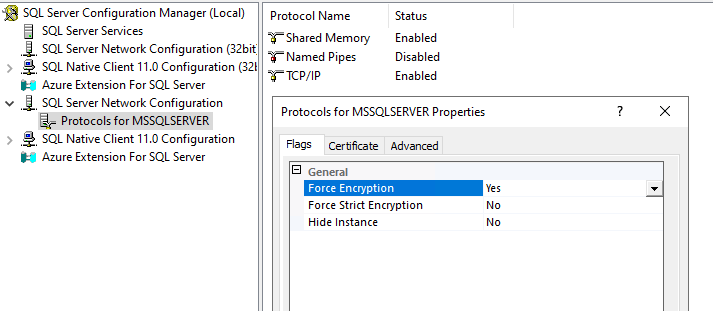
And your SQL Server instance is using a self-signed certificate (this one is key),
Then, if you install MSOLEDBSQL 19 drivers and explicitly
Trust server certificate,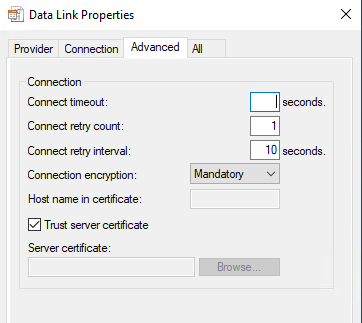
You’ll sadly NEVER get the connection to work.
Instead, no matter what you do, you’ll keep bumping into this error:
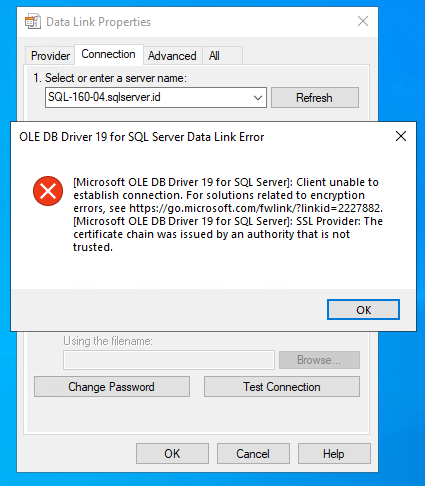
Where the text for the error is:
[Microsoft OLE DB Driver 19 for SQL Server]: Client unable to establish connection. For solutions related to encryption errors, see https://go.microsoft.com/fwlink/?linkid=2227882.
[Microsoft OLE DB Driver 19 for SQL Server]: SSL Provider: The certificate chain was issued by an authority that is not trusted.
With the salient bit of info being this error text: SSL Provider: The certificate chain was issued by an authority that is not trusted.
The Bug that Makes it Look like You've Misconfigured Things
Unfortunately, the error you get when you encounter this bug looks exactly like what you'd expect IF you had either:
- Failed to instruct your drivers to explicitly 'Trust server certificate'
- or
- You've misconfigured something - i.e., just plain mangled some of the options.
And, in an incredible twist of irony, another issue with this bug is that the help link for additional troubleshooting guidance provided by the error message not only WORKS (at the time of writing - i.e., Microsoft are masters of link-rot), but also provides some GREAT troubleshooting guidance and help.
Only, in this case - the actual problem is that there's something going on within older MSOLEDBSQL 18 drivers that FULL ON prevents the Trust server certificate option within MSOLEDBSQL 19 drivers from EVER working - no matter which options or configuration settings you enable.
The Fix
Happily, the steps to correct this issue are borderline trivial. All you need to do is:
Uninstall previous MSOLEDBSQL 18 drivers (via Settings > Apps)

Re-Run the installer for MSOLEDBSQL 19 drivers
and use the
Removeoption (vs Modify or Repair)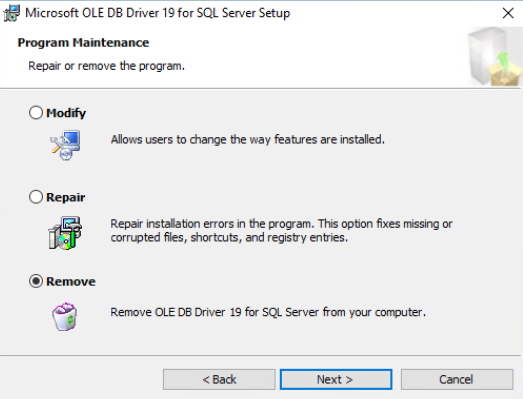
Once you've removed both MSOLEDBSQL 18 and MSOLEDBSQL 19 drivers,
Re-run the MSOLEDBSQL 19 installer to re-install the v19 drivers (i.e., just as if you're installing them for the first time).
That's it - with those older MSOLEDBSQL 18 drivers removed and the v19 drivers installed 'fresh', there are no more problems and everything works 100% as expected.
💡 Tip:
I did NOT have to reboot my Windows Server 2022 instances when executing the steps above - i.e., I was able to uninstall v18 drivers, remove v19 drivers, and re-install v19 drivers all without ANY reboot, then re-test connectivity and everything just worked.
Bonus Points - Digging Deeper and a Simple Repro
If you want to confirm that the problem you're running into is the one described above - or if you want to reproduce this in your own environment, it's pretty simple to do:
- Spin up a new instance of Windows 11 or Windows Server 2022 - i.e., brand new install.
- Install SSMS 19.2 - using default options.
- For whatever reason, this will install MSOLEDBSQL 18.6.7 drivers (which SSMS patently doesn't use). (Hmm, maybe
sqlcmduses these.)
- For whatever reason, this will install MSOLEDBSQL 18.6.7 drivers (which SSMS patently doesn't use). (Hmm, maybe
- Install MSOLEDBSQL 19 (latest - v19.3.5.0 at the time of writing) drivers
- Test out connectivity to a SQL Server instance with a self-signed cert - using the
Force Encryptionflag - And that's it - no matter what you try, you won't be able to get your connection to work.
Warning:
Arguably, you COULD simply disable the Force Encryption flag - though, that'd be very silly. (There are some arguments for trusting self-signed certs in a number of environments - even if this isn't IDEAL; but disabling encryption entirely (well, leaving it up to client apps) as means of 'upgrading' to the improved and better security afforded by MSOLEDBSQL19 drivers ... just doesn't make any sense.)
Otherwise, if you're trying to determine IF the problem you're running into with forced TLS/Encryption is due to this bug, then you'll find that a connection string that works JUST FINE on a box that has either NEVER had MSOLEDBSQL 18 drivers OR which has had them removed BEFORE installation of MSOLEDBSQL19 drivers simply won't work in a situation where older v18 drivers are already 'in place' before (or as) v19 drivers are concurrently installed.